

Rename Refresh entry by your name
Before starting the tutorial please have a a look at the following screen-shots so that you get an idea what I am talking about.
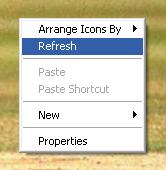
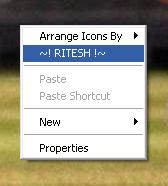
open shell32.dll using resource hacker
- Once you have opened shell32.dll in Resource Hacker, go to
Menu > 215 > 1033
- here you will find some thing similar to this
215 MENUEX
LANGUAGE LANG_ENGLISH, SUBLANG_ENGLISH_US
{
POPUP “”, 0, MFT_STRING, MFS_ENABLED, 0
{
POPUP “&View”, 28674, MFT_STRING, MFS_ENABLED, 0
{
MENUITEM “Filmstri&p”, 28719, MFT_STRING, MFS_ENABLED
MENUITEM “T&humbnails”, 28717, MFT_STRING, MFS_ENABLED
MENUITEM “Tile&s”, 28718, MFT_STRING, MFS_ENABLED
MENUITEM “Ico&ns”, 28713, MFT_STRING, MFS_ENABLED
MENUITEM “&List”, 28715, MFT_STRING, MFS_ENABLED
MENUITEM “&Details”, 28716, MFT_STRING, MFS_ENABLED
}
MENUITEM “”, 65535, MFT_SEPARATOR, MFS_ENABLED
POPUP “Arrange &Icons By”, 28673, MFT_STRING, MFS_ENABLED, 0
{
MENUITEM “”, 30208, MFT_SEPARATOR, MFS_ENABLED
MENUITEM “Show in &Groups”, 30209, MFT_STRING, MFS_ENABLED
MENUITEM “&Auto Arrange”, 28753, MFT_STRING, MFS_ENABLED
MENUITEM “A&lign to Grid”, 28756, MFT_STRING, MFS_ENABLED
}
MENUITEM “R&efresh”, 28931, MFT_STRING, MFS_ENABLED
MENUITEM “”, 65535, MFT_SEPARATOR, MFS_ENABLED
MENUITEM “Customize This &Folder…”, 28722, MFT_STRING, MFS_ENABLED
MENUITEM “”, 65535, MFT_SEPARATOR, MFS_ENABLED
MENUITEM “&Paste”, 28698, MFT_STRING, MFS_ENABLED
MENUITEM “Paste &Shortcut”, 28700, MFT_STRING, MFS_ENABLED
MENUITEM “&Undo”, 28699, MFT_STRING, MFS_ENABLED
}
}- Now to rename the “Refresh” with your name in the following line
MENUITEM “Refresh”, 28931, MFT_STRING, MFS_ENABLED- edit the above code like below
MENUITEM “~! RITESH !~”, 28931, MFT_STRING, MFS_ENABLED- Once you have done this click on Compile button. The finalCode would look like this
215 MENUEX
LANGUAGE LANG_ENGLISH, SUBLANG_ENGLISH_US
{
POPUP “”, 0, MFT_STRING, MFS_ENABLED, 0
{
POPUP “&View”, 28674, MFT_STRING, MFS_ENABLED, 0
{
MENUITEM “Filmstri&p”, 28719, MFT_STRING, MFS_ENABLED
MENUITEM “T&humbnails”, 28717, MFT_STRING, MFS_ENABLED
MENUITEM “Tile&s”, 28718, MFT_STRING, MFS_ENABLED
MENUITEM “Ico&ns”, 28713, MFT_STRING, MFS_ENABLED
MENUITEM “&List”, 28715, MFT_STRING, MFS_ENABLED
MENUITEM “&Details”, 28716, MFT_STRING, MFS_ENABLED
}
MENUITEM “”, 65535, MFT_SEPARATOR, MFS_ENABLED
POPUP “Arrange &Icons By”, 28673, MFT_STRING, MFS_ENABLED, 0
{
MENUITEM “”, 30208, MFT_SEPARATOR, MFS_ENABLED
MENUITEM “Show in &Groups”, 30209, MFT_STRING, MFS_ENABLED
MENUITEM “&Auto Arrange”, 28753, MFT_STRING, MFS_ENABLED
MENUITEM “A&lign to Grid”, 28756, MFT_STRING, MFS_ENABLED
}
MENUITEM “~! RITESH !~”, 28931, MFT_STRING, MFS_ENABLED
MENUITEM “”, 65535, MFT_SEPARATOR, MFS_ENABLED
MENUITEM “Customize This &Folder…”, 28722, MFT_STRING, MFS_ENABLED
MENUITEM “”, 65535, MFT_SEPARATOR, MFS_ENABLED
MENUITEM “&Paste”, 28698, MFT_STRING, MFS_ENABLED
MENUITEM “Paste &Shortcut”, 28700, MFT_STRING, MFS_ENABLED
MENUITEM “&Undo”, 28699, MFT_STRING, MFS_ENABLED
}
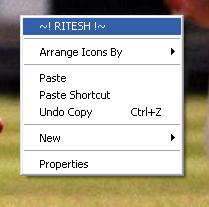
}- Now Save this as Shell32_new.dll in your desktop. Now Usereplacer to Replace original Shell32.dll with Shell32_new.dll. After replacing restart your Windows to see changes.
215 MENUEX
LANGUAGE LANG_ENGLISH, SUBLANG_ENGLISH_US
{
POPUP “”, 0, MFT_STRING, MFS_ENABLED, 0
{
POPUP “&View”, 28674, MFT_STRING, MFS_ENABLED, 0
{
MENUITEM “Filmstri&p”, 28719, MFT_STRING, MFS_ENABLED
MENUITEM “T&humbnails”, 28717, MFT_STRING, MFS_ENABLED
MENUITEM “Tile&s”, 28718, MFT_STRING, MFS_ENABLED
MENUITEM “Ico&ns”, 28713, MFT_STRING, MFS_ENABLED
MENUITEM “&List”, 28715, MFT_STRING, MFS_ENABLED
MENUITEM “&Details”, 28716, MFT_STRING, MFS_ENABLED
}
MENUITEM “”, 65535, MFT_SEPARATOR, MFS_ENABLED
MENUITEM “~! RITESH !~”, 28931, MFT_STRING, MFS_ENABLED
POPUP “Arrange &Icons By”, 28673, MFT_STRING, MFS_ENABLED, 0
{
MENUITEM “”, 30208, MFT_SEPARATOR, MFS_ENABLED
MENUITEM “Show in &Groups”, 30209, MFT_STRING, MFS_ENABLED
MENUITEM “&Auto Arrange”, 28753, MFT_STRING, MFS_ENABLED
MENUITEM “A&lign to Grid”, 28756, MFT_STRING, MFS_ENABLED
}
MENUITEM “”, 65535, MFT_SEPARATOR, MFS_ENABLED
MENUITEM “Customize This &Folder…”, 28722, MFT_STRING, MFS_ENABLED
MENUITEM “”, 65535, MFT_SEPARATOR, MFS_ENABLED
MENUITEM “&Paste”, 28698, MFT_STRING, MFS_ENABLED
MENUITEM “Paste &Shortcut”, 28700, MFT_STRING, MFS_ENABLED
MENUITEM “&Undo”, 28699, MFT_STRING, MFS_ENABLED
}
}
If you have any difficulty in please replyNote: Applies to Windows XP
Popular Posts:
- Beautiful Christmas Wallpaper
- Windows 7 beginners guide – Free eBook
- Microsoft Live Labs Introduces Pivot a new Internet Browser
- IE Tweaker- a power tool for Internet Explorer
- Sixth Sense a challenge to Microsoft’s Surface
- Anand Khanse Interview
- beingPC Wallpapers
- Ankit Fadia gave suggestions to US Government past 9/11 attack
- Get Premier Rapidshare Account for free
- Visual Studio ALM Challenge
You Might Also Like:
- Bring back Windows XP Quick Launch in Windows 7
- Stop Cut, Copy, Paste & Delete by Prevent
- Wordpress 2.9 is Available for download
- How To read daily feeds of your favorite website on desktop
- How To Create Windows Media Player Skin
- Customize your desktop with Rainmeter – Part 1
- IE Tweaker- a power tool for Internet Explorer
- God Mode Creator Launched
- Celebrities on twitter how many of them you follow
- All Google Services that makes our Virtual life easy


